

NEW iPhone 17 features
27
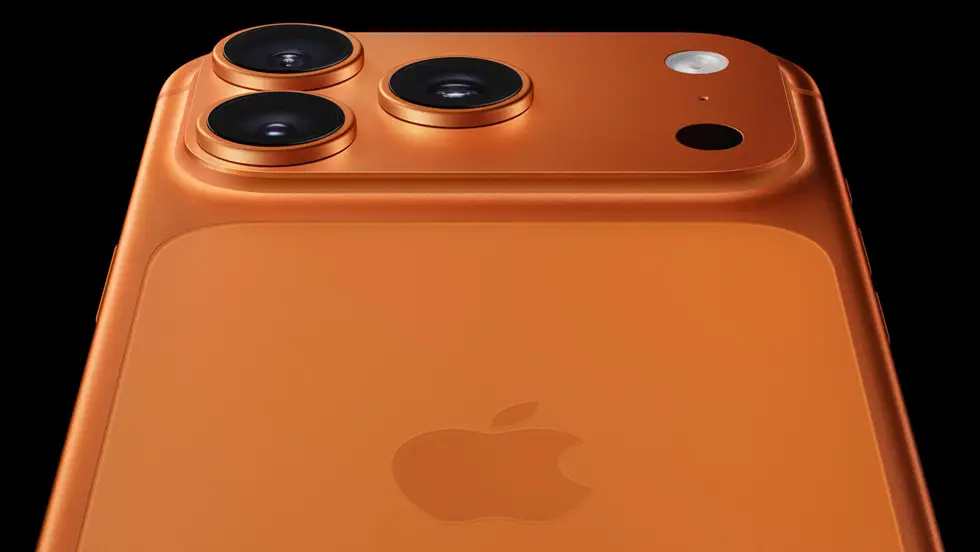
Here are some of the major new features (and also practical implications) of the iPhone 17 simplified so you can easily understand whether they matter for you.
What’s new
- A larger 6.3-inch Super Retina XDR display (up from 6.1″) and now supports ProMotion up to 120 Hz — meaning smoother scrolling, animations, and generally more responsive feel. MacRumors+2MacRumors+2
- Displays now have a tougher front glass “Ceramic Shield 2” with about 3× better scratch resistance than previous model. Apple
- Rear camera system: all 48 MP sensors (for the base model) for both main and ultra-wide. That means much higher resolution, improved detail and flexibility. Apple+1
- Front (“selfie”) camera: new 18 MP square sensor, improved field of view so you can take landscape or portrait selfies while holding phone vertically (less rotating) + better video and group shots. MacRumors+1
- A brand new chip: the A19, built on 3-nm process, better CPU/GPU/Neural Engine — more power efficiency, better performance, and more capability for on-device AI (for features like live translation etc.). Apple+1
- Better battery life and faster charging: Apple claims up to ~30 hours of video playback for the base model. Also fast-charging to ~50% in ~20 minutes with a 40 W charger. MacRumors
- Improved wireless/connectivity: new Apple-designed “N1” networking chip supports WiFi 7, Bluetooth 6 and Thread (smart-home protocol) in the iPhone 17 series. The Verge
- Bigger base storage: starts at 256 GB instead of the lower previous base. Apple
What does it mean for you & should you care
- If you use your phone a lot for gaming, smooth visuals, or scrolling (social media, websites) the 120 Hz display will feel noticeably better compared to 60 Hz.
- If you take photos/videos, especially ultra-wide or self-subs/selfies, the upgraded cameras will give better resolution and more flexibility.
- If you keep your phone for many years, the tougher glass + more efficient chip + bigger storage mean the iPhone 17 is more future-proof.
- If you travel or connect a lot (WiFi, hotspot) the upgraded connectivity helps — though you’ll need compatible routers/devices to fully benefit.
- On the flip side: if you’re using an iPhone 16 or even a few generations back, you’ll see larger jump; but if you have very recent phone (say iPhone 16 with 120Hz already), some upgrades might feel incremental.
Things to check/ask before purchase
- Confirm charger: to reach those fast-charging numbers you’ll need a 40 W or higher compatible power adapter (sold separately) for best speeds.
- Check whether your carrier/network in Uganda supports the newer connectivity tech (WiFi 7, Thread) — many accessories still work fine with older versions.
- Consider cost vs benefit: if you’re mainly using basic features (calls, WhatsApp, browsing) you might not feel every upgrade immediately.
- Accessories & case fit: because of new camera sensors/size/weight, older cases may not fit perfectly.
- Long-term software updates: Apple tends to support many years, so buying newer model gives you longer lifespan.






Related Articles

TikTok US Operations Shift to New Joint Venture
The social media landscape is experiencing a significant shift as ByteDance, the...
Apple Announces New iOS Features and Changes in Japan
Apple updates offer enhanced options for developers to distribute apps and handle...

Today’s Money Tip
Shop the Store Where Lost Airline Luggage Ends Up Ever wonder what...


US Black Friday 2024 Sets New Record With $11.8 Billion in Online Sales — Adobe Analytics
Nov 29 (Techy Solutions) – AI-powered shopping tools helped drive a surge...